TOT - دورة إعداد مدربى الروبوتات والإلكترونيات للأطفال

- وصف
- المناهج الدراسية
- المراجعات
Hurry Up!
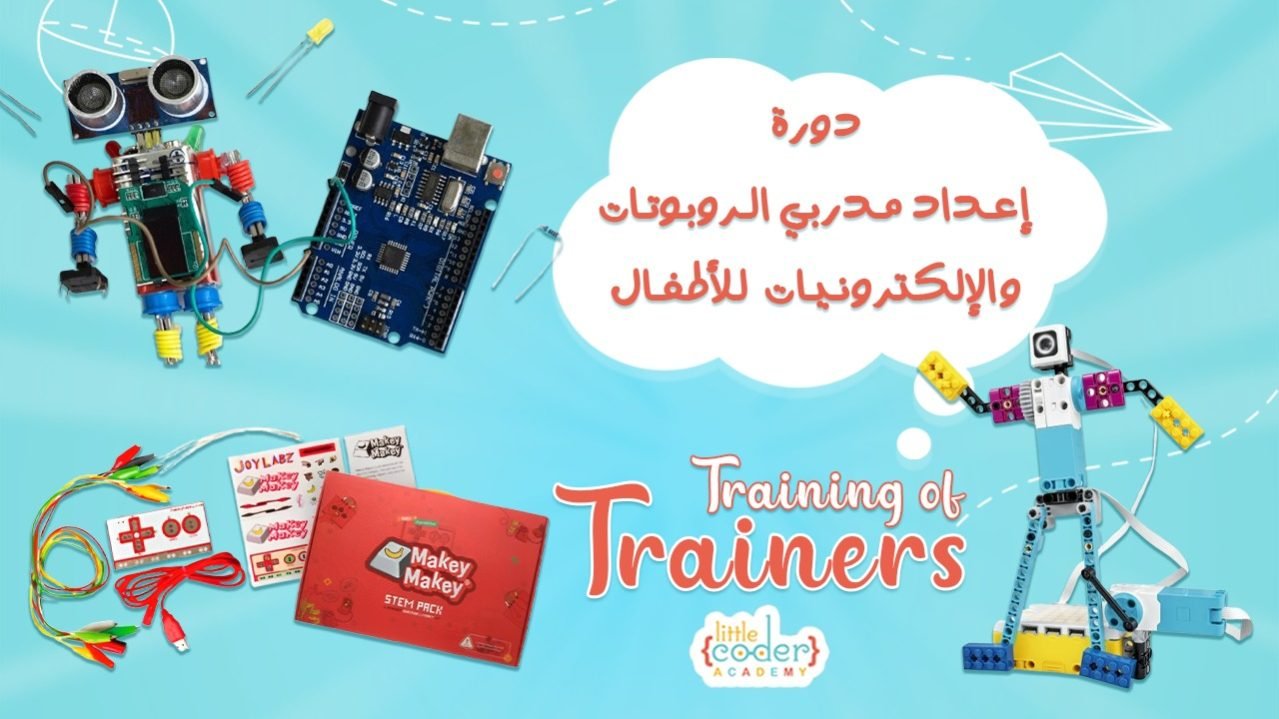
🎓 كورس إعداد المدربين لتعليم الروبوتات والإلكترونيات للأطفال (من عمر 4 إلى 18 سنة)
🎯 الفئة المستهدفة:
المدربين، المعلمين، وكل من يسعى لتعليم البرمجة والروبوتات للأطفال من مختلف الأعمار.
🧠 محتوى الكورس:
يتناول الكورس جميع مراحل تعليم الروبوتات للأطفال، مقسّمة حسب الفئات العمرية، ويشمل شرحًا وتطبيقًا عمليًا على مجموعة متنوعة من الروبوتات والأدوات التعليمية.
🧩 الروبوتات والأدوات التي يتم التطبيق العملي عليها:
- Tale-Bot
- Pro-Set
- LEGO SPIKE Essential & Prime
- Micro:bit
- Makey Makey
- Quarky
- Vinci
- mBot
- Snap Circuits
- Paper Circuits
- Tinkercad
- أساسيات الإلكترونيات باستخدام Breadboard
- Arduino
🛠️ كل وحدة تشمل:
- شرح عملي مباشر على الروبوت.
- أفكار تطبيقية ومشاريع تعليمية.
- كيفية دمج الأدوات ضمن مناهج STEAM.
💡 نظام الدراسة:
- تعليم ذاتي بالكامل (Self-paced).
- الوصول لجميع الدروس المسجّلة بمجرد الاشتراك.
- التعلّم من أي مكان وفي أي وقت.
🤝 الدعم والمتابعة بعد الاشتراك:
- ✅ الانضمام إلى جروبات التواصل:
- جروب Facebook لجميع المشتركين لتبادل النقاشات والخبرات.
- جروب WhatsApp عام للنقاش والتفاعل.
- ✅ دعم مباشر عبر WhatsApp لمدة 6 شهور.
- ✅ جلسة دعم شهرية عبر Zoom لمدة 6 أشهر بعد الاشتراك، تشمل:
- مناقشة الأسئلة.
- مشاركة الإنجازات.
- تقديم الدعم الفني.
- ✅ يوم أسبوعي لفتح الأسئلة في الجروب (لمدة 4 ساعات)، ثم تجميع الإجابات من قبل المدربة المسؤولة.
📌 هدف الدعم: ضمان التزام المتدرب بخطة زمنية واضحة تُساعده على إتمام الدراسة بكفاءة وفعالية.
📜 الشهادة المعتمدة:
بعد الانتهاء من الدراسة وتسليم المشاريع المطلوبة، يحصل المتدرب على شهادة معتمدة من الأكاديمية، تحمل لوجو الأكاديمية وشعار STEAM.
📥 للمزيد من التفاصيل:
- انضم لجروب المتابعة على WhatsApp 👇
- شاهد فيديوهات شرح الكورس، آراء المتدربين، ونماذج من مشاريعهم على الصفحة.
1- Session 1 -- No Screen Kits
2- Session 2 -- Spike Essential & Prime
3- Session 3 -- Microbit + Makey Makey
4- Session 4 -- Quarky
-
28
 4.1- Quarky – Smart Educational Robot
 -
29
4.2- Inside the Quarky Robot
-
30
4.3- Quarky for Juniors
-
31
4.4- Quarky for Seniors
-
32
4.5- Quarky (AI)
-
33
4.6- Quarky Sensors
-
34
4.7- Quarky Actuators
-
35
4.8- Quarky Robotics
-
36
4.9- Combining Robotics and Coding in STEM Education
-
37
4.10- Resources of Quarky
-
38
4.11- Assignments
5- Session 5 -- Vinci & MBot
-
39
5.1- VinciBot – Educational Robot
-
40
5.2- Inside the VinciBot
-
41
5.3- Hands-On Projects with VinciBot
-
42
5.4- Resources of VinciBot
-
43
5.5- MBot – Educational Robot
-
44
5.6- Inside the MBot
-
45
5.7- MBot + mBlock in Action
-
46
5.8- MBot LED & Motors
-
47
5.9- MBot Sensors
-
48
5.10- Resources of MBot
-
49
5.11- Combining Robotics and Coding in STEM Education
-
50
5.12- Assignments
6- Session 6 -- Electronics for Kids
-
51
6.1- Electronics for Kids
-
52
6.2- Electronics Education for Kids
-
53
6.3- Basics of Electronics for Juniors
-
54
6.4- Electronics Made Easy for Kids
-
55
6.5- Snap Circuits
-
56
6.6- Paper Circuits
-
57
6.7- DIY Projects for Juniors
-
58
6.8- Combining Electronics and Coding in STEM Education
-
59
6.9- Resources of Electronics for Juniors
-
60
6.10- Assignments
7- Session 7 -- Electronics for Seniors
-
61
7.1- Electronics for Seniors
-
62
7.2-Breadboards
-
63
7.3- Wires Used in Breadboard Connections
-
64
7.4- Multimeter & Voltameter
-
65
7.5- Circuit Diagram
-
66
7.6- Circuits Simulation
-
67
7.7- Diode, Transistor, Capacitor, Potentiometer & Potentiometer
-
68
7.8- DIY Projects for Seniors
-
69
7.9- Resources of Electronics for Seniors
-
70
7.10- Assignments
Session 8 -- From AC to DC & ICs
Session 9 -- 7 Segments & PCB
Session 10 -- Introduction to Arduino
-
87
10.1- What is Arduino?
-
88
10.2-- Arduino Boards’ Types
-
89
10.3-- Inside the Arduino Board
-
90
10.4-- Digital vs. Analog — Inputs & Outputs on Arduino
-
91
10.5- Programming Tools for Arduino
-
92
10.6- Basic Arduino Circuits
-
93
10.7- Interactive & Smart Circuits
-
94
10.8- Resources of Arduino & Assignments
Session 11 -- Arduino Sensors & Disply Modules
Session 12 -- Arduino Sensors & Disply Modulesv
-
104
12.1- Arduino Communications
-
105
12.2- Arduino Serial Connection
-
106
12.3- Arduino Bluetooth Connection
-
107
12.4- Dabble Control System
-
108
12.5- Protocol-Based Sensors
-
109
12.6- Protocol-Based Projects
-
110
12.7- Smart Control & Access System
-
111
12.8- Teaching Advanced Sensors for Kids
-
112
12.9- Resources of Arduino & Assignments
يرجى، تسجيل الدخول لترك مراجعة
تفاصيل الدورة
المدة
8 Sessions
محاضرات
112
فيديو.
24 Hours
المستوى
متوسط
الدورات الشائعة